


 Sign in with LinkedIn
From draft to done: agentic Copilot in Excel, Word, and PowerPoint | Microsoft Community Hub
From draft to done, without leaving the file. The Microsoft blog post shows how agentic Microsoft 365 Copilot takes multi-step actions inside the apps your business users already work in. Read the blog post to see what Pong Agencies Limited can bring to your everyday work.
What does “agentic Copilot” mean in Excel, Word, and PowerPoint?
When Microsoft describes Copilot as agentic in Excel, Word, and PowerPoint, it means Copilot can now take multi-step, in-app actions directly inside your files instead of just giving you suggestions to copy and paste.
In practice, that looks like this:
- Works where you already work: Copilot edits directly in your Excel workbooks, Word documents, and PowerPoint decks using native tables, formulas, charts, styles, and layouts.
- Multi-step workflows: You can ask for outcomes like “build a 12‑month P&L forecast” or “refresh this monthly exec report” and Copilot handles the sequence of steps inside the file.
- Grounded in your current work: With Work IQ, Copilot stays aligned to what’s current across your files, meetings, chats, and relationships, so it can pull in the latest decisions, dates, and details.
- Transparent and reversible: Changes are applied in the file in a way that’s visible, reviewable, and reversible, so you can inspect edits, tweak assumptions, and iterate safely.
- One shared version: Because everyone works in the same file, teams can coauthor and refine a single version instead of emailing multiple copies around.
- Built-in model choice: You can choose between OpenAI and Anthropic models (with additional options like GPT‑5.4 and Claude Opus 4.6 rolling out) without leaving the app.
- Enterprise-grade controls: Copilot honors existing Microsoft 365 permissions and sensitivity labels, so it only works with content users are allowed to see.
The net effect is that Copilot helps you reimagine routine work—turning in-progress spreadsheets, drafts, and decks into outcomes you’re ready to share, while keeping you in control of the final result.
How can Copilot help in Excel, Word, and PowerPoint with real examples?
Agentic Copilot is designed to support the kind of iterative work most teams already do. Here are some practical examples by app:
Excel: build models you can trust
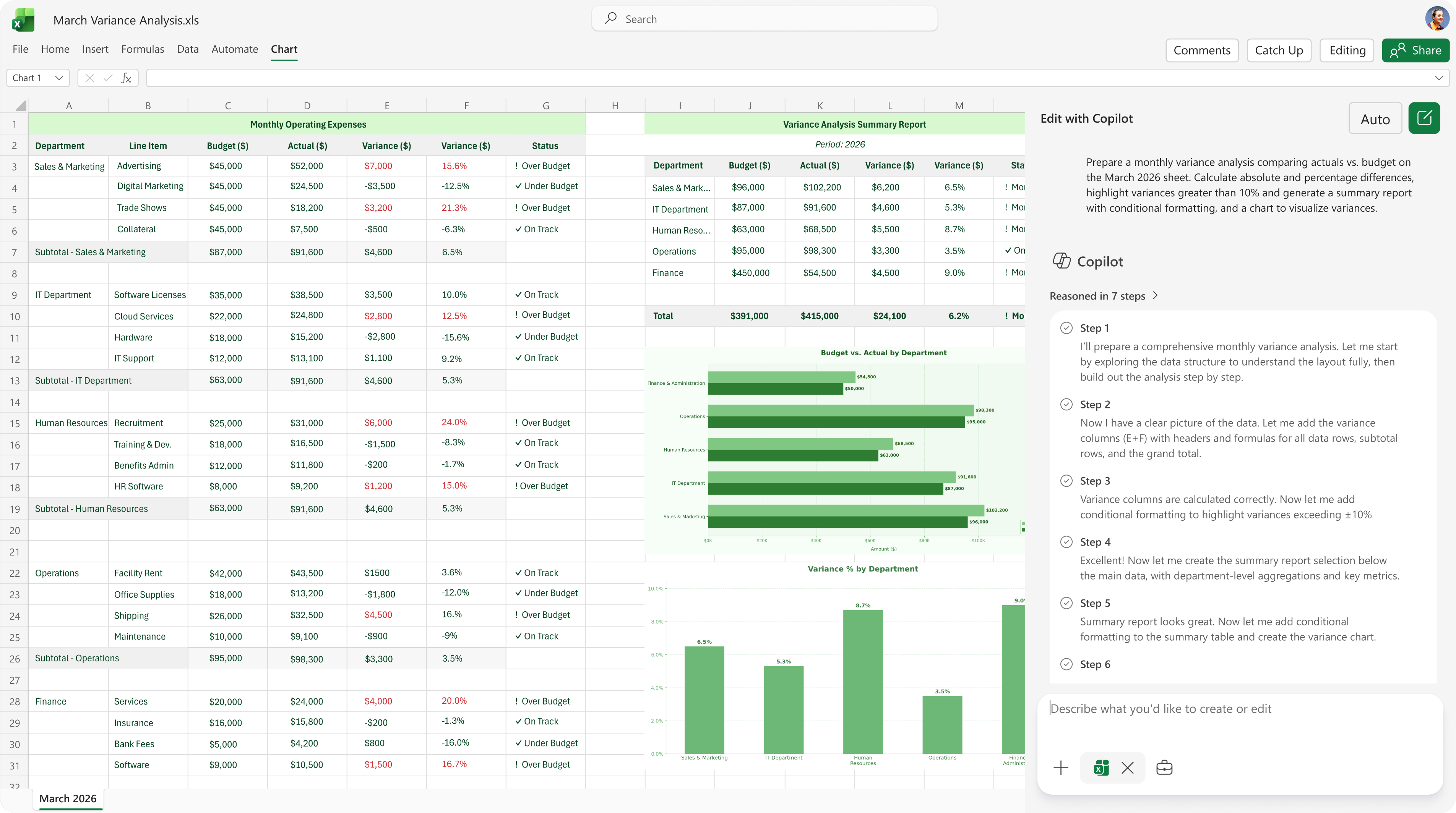
- Financial forecasting: Ask Copilot to create a 12‑month P&L forecast starting January 2026 using the latest data from a workbook like Operating Model.xlsx. It can model revenue, cost of goods sold, operating expenses, growth, retention, and unit economics with adjustable assumptions.
- Sales performance refresh: Have Copilot replicate last week’s analysis in a new sheet using the latest numbers from a document such as Sales Weekly Update.docx. It can highlight customer churn trends and visually flag areas of concern.
- Valuation with sensitivity analysis: Copilot can build a discounted cash flow model using web disclosures, assuming for example 12% annual free cash flow growth for 5 years, a 9% discount rate, and a 2% terminal growth rate. It can add sensitivity tables that vary discount rate from 8–10%, growth from 10–14%, and terminal growth from 1–3%, plus a dropdown for best/base/worst cases.
All of this is done with native tables, formulas, and charts directly in the grid, so you can audit and adjust the logic.
Word: move from draft to review-ready
- Project status decision briefs: Copilot can create a brief for a specific project using information from your recent meetings, files, and emails over a chosen timeframe. It structures the doc with sections like Current status, Key decisions and progress, Next steps, Unresolved issues or risks, and Recommendations, and flags missing inputs as questions.
- Recurring executive reports: You can hand Copilot last month’s executive update and ask it to refresh it for this month. It will pull the latest from team emails and Teams chats, update only the last three columns of your status table, apply green/yellow/red status icons, and explain off-track items. New text can be applied in blue font so reviewers can quickly see what changed.
- Formatting and polish: Copilot can clean up heading hierarchy, spacing, fonts, lists, and tables, reorganize long sections with subheadings or tables, and align tone and formatting with your recent proposals or reports.
PowerPoint: keep decks clear and on-brand
- Executive presentations with web data: Copilot can build a deck on market pressures and trends in your industry, including a high-level competitive analysis of leading players and a closing slide on implications for industry leaders.
- Turn text into visuals: On an existing slide, you can ask Copilot to transform text into a chart, timeline, diagram, or other visual to make the message easier to grasp.
- Brand consistency checks: Using your organization’s brand kit, Copilot can run a brand check on a slide to align colors, layouts, object styles, and images with your guidelines.
Across all three apps, the pattern is similar: you describe the outcome, Copilot does the heavy lifting inside the file, and you stay focused on reviewing, adjusting, and making decisions.
What’s available today and how does security and model choice work?
Availability, security, and model choice are core to how agentic Copilot is rolling out across Microsoft 365.
What’s available today
- Excel: Agentic Copilot is generally available today in Excel for Windows, web, and Mac for Microsoft 365 Copilot users. It supports locally stored workbooks, file uploads, and file search. Work IQ grounding is rolling out this month, and additional model options like GPT‑5.4 and Claude Opus 4.6 will follow in the coming weeks.
- Word: The new editing experience is generally available today in Word on Windows, web, and Mac for Microsoft 365 Copilot users. Model choice between OpenAI and Anthropic models is planned to be available in April.
- PowerPoint: Copilot editing is currently rolling out to the web for Microsoft 365 Copilot users and will become available on Windows and Mac in the coming months.
Security, permissions, and compliance
- Permissions-aware: Copilot respects existing Microsoft 365 permissions and sensitivity labels. It only surfaces and edits content that a given user is already allowed to access.
- Grounded in your tenant: With Work IQ, Copilot stays aligned to your organization’s current files, meetings, chats, and relationships, while operating within your existing compliance and governance boundaries.
- Transparent editing: Because changes are applied directly in the file and are easy to review and undo, you maintain control over what gets shared or published.
Model choice and flexibility
- Multiple model providers: Within the apps, you can choose between OpenAI and Anthropic models for in-app editing, and more options (such as GPT‑5.4 and Claude Opus 4.6) are being introduced.
- Match model to task: This lets you align the model to the nature of the work—whether it’s numerical modeling in Excel, narrative refinement in Word, or visual storytelling in PowerPoint—without switching tools.
For organizations, this combination of clear availability roadmap, permissions-aware behavior, and built-in model choice makes it easier to introduce agentic Copilot into existing workflows while staying aligned with security and compliance requirements.